




























































Creating a Private Instagram or Facebook Group for Wedding Updates — The Complete NRI Wedding Planning Guide
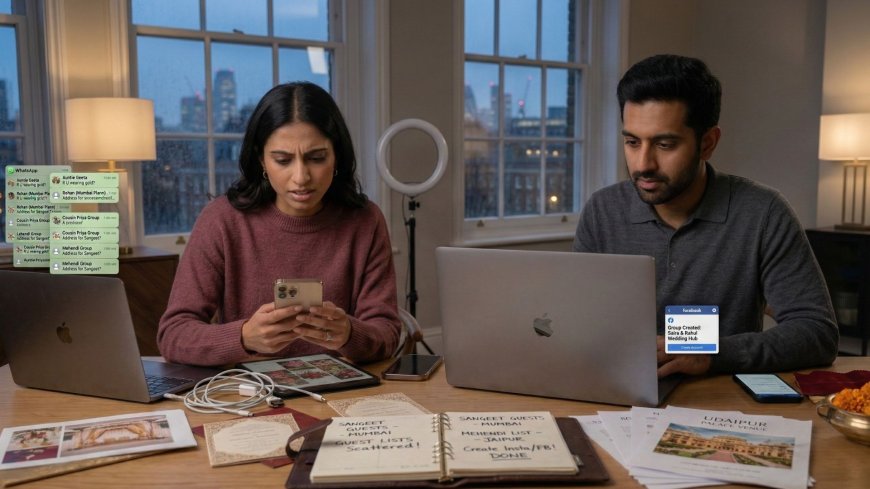
Six weeks before the wedding, the bride counted 143 unanswered messages across 11 WhatsApp chats. Guests repeated the same questions, some answers were inconsistent across groups, and confusion kept growing. Managing communication for over 200 guests had become overwhelming. Creating a private Instagram account or Facebook Group offered a solution—one central space where guests could find accurate updates. This guide shows NRI couples how to build and manage a private wedding social platform, from choosing between Instagram or Facebook to setting privacy, posting schedules, sharing travel and dress information, and managing updates during wedding week. The goal is to reduce message chaos and keep guests informed, connected, and engaged throughout the celebration.

Creating a Private Instagram or Facebook Group for Wedding Updates
The Hundred and Forty-Three Messages
The bride counted them on a Tuesday evening six weeks before the wedding.
She had not set out to count them. She had opened her WhatsApp to find a message from the venue coordinator and had, in the process of scrolling to find it, noticed the volume of unanswered messages from guests, family members, and well-wishers that had accumulated since the invitations went out four weeks earlier.
One hundred and forty-three messages. Across eleven different WhatsApp chats — the immediate family group, the extended family group, the friends group, the bridesmaids group, the international guests group, the groom's family group that she had been added to six months ago, the wedding planning group with the planner and the key vendors, and four individual conversations with family members whose questions had not been directed to any group.
The messages were not unwelcome. They were, individually, expressions of love and excitement and the specific engaged interest of people who were looking forward to the wedding. But collectively they represented a specific communication management problem: the same information — the dress code for the sangeet, the hotel shuttle times, the dietary registration link, the cultural guide for the international guests — had been asked multiple times across multiple chats and answered each time individually, which meant that the answers were distributed across eleven conversations in a format that required the bride to remember which answer she had given to which person in which chat.
She had answered some questions three times. She had forgotten to answer some questions entirely. She had answered a question in the bridesmaids group that had also been asked in the extended family group and had answered it differently — not incorrectly, but with different levels of detail — which had produced a follow-up question from a family member who had compared notes with a bridesmaid and encountered a discrepancy.
The groom, when she described the situation to him, suggested that they needed a single place where the wedding information lived — where guests could go to find the answers to their questions before asking them, where updates could be posted once and seen by everyone who needed to see them, and where the communication of the wedding's practical details could be managed without requiring the bride to be the information switchboard for two hundred and thirty people simultaneously.
The private Instagram account or the Facebook group — the dedicated digital space for the wedding's guest community — is the specific tool that solves the problem the bride had counted her way into on Tuesday evening. Not WhatsApp, which is excellent for direct communication and inadequate as an information repository. Not the wedding website, which is a publishing platform rather than a community space. But the private social platform that combines the information repository function of the website with the community and communication function of the social network — in a format that the majority of the wedding's guests already know how to use.
This guide builds that space — the complete framework for creating, populating, and managing the private Instagram account or Facebook group that turns the one hundred and forty-three messages into a manageable communication system and the two hundred and thirty guests into an informed and connected community.
The Tool Choice: Instagram vs Facebook vs Both
The Case for Private Instagram
The private Instagram account — created specifically for the wedding, set to private so that only approved followers can see its content — is the tool that most effectively serves the younger and international segment of the NRI wedding guest list.
The advantages:
Visual storytelling: Instagram's format is designed for visual content — the photograph, the short video, the story — which aligns naturally with the wedding's visual character. The venue preview, the outfit detail, the behind-the-scenes planning moment — these pieces of content are served better by Instagram's visual format than by Facebook's text-oriented one.
The Stories format: Instagram Stories — the twenty-four-hour content that appears at the top of followers' feeds — is the ideal format for time-sensitive wedding updates. The shuttle schedule reminder posted as a Story three hours before the departure is seen by the guests who are currently on Instagram without requiring them to navigate to the account's main feed.
The younger generation's natural habitat: The guests who are most likely to check Instagram regularly, most likely to engage with the content, and most likely to share the account with their friends are the younger guests — the cousins, the college friends, the international colleagues — whose primary social media engagement is on Instagram rather than Facebook.
The aesthetic control: Instagram's grid format allows the couple to curate a visually consistent account that reflects the wedding's aesthetic — a gallery of venue photographs, mood board images, and planning moments that builds anticipation as the wedding approaches.
The limitations:
The older generation gap: The family members whose primary social media platform is Facebook or WhatsApp — which, at many NRI weddings, represents a significant proportion of the older Indian guest population — may not have Instagram accounts or may not be comfortable navigating the platform. An Instagram-only approach may not reach these guests.
The character limit: Instagram captions have a character limit that constrains the length of informational posts — the comprehensive shuttle schedule or the cultural guide for international guests cannot be posted in full as an Instagram caption and must be linked to an external resource.
The Case for Facebook Group
The private Facebook group — a closed group that requires admin approval to join and whose content is visible only to members — is the tool that most effectively serves the older and India-based segment of the NRI wedding guest list.
The advantages:
The older generation's natural habitat: The aunts, the uncles, the parents' friends, the older family members who are active on social media but whose platform is Facebook rather than Instagram are reached by the Facebook group in a way that the Instagram account is not.
The information repository function: Facebook group posts are permanent, searchable, and organizable — the complete dress code information, the shuttle schedule, the cultural guide, and the accommodation details can each be posted as separate, comprehensive posts that members can find through the group's search function when they need them.
The event feature: Facebook Groups can create Events within the group — the sangeet, the ceremony, the reception each as a separate Facebook Event with its own guest list, RSVP function, and associated information. The family member who marks themselves as Attending on the Facebook Event has provided the RSVP through a familiar mechanism.
The announcement pinning: Posts in Facebook Groups can be pinned to the top of the group's feed — the most important information, the most time-sensitive update, the post that every member needs to see is pinned and remains visible without being buried by subsequent posts.
The limitations:
Facebook's declining younger generation engagement: The guests under thirty-five who are most active on Instagram and least active on Facebook may not check the Facebook group regularly — or may not have Facebook accounts at all.
The format's visual limitations: Facebook's interface, while capable of displaying photographs and videos, is less visually oriented than Instagram and less suited to the aesthetic content that builds wedding anticipation.
The Recommendation: A Coordinated Both Approach
For most NRI weddings with a guest list that spans generations and cultures, the optimal approach is a coordinated both strategy — a private Instagram account for the younger and international guests and a Facebook Group for the older and India-based guests, with the same core information posted to both platforms and the platform-specific features used for the content that each platform serves best.
The coordinated both approach requires more management than a single-platform strategy but serves the full breadth of the NRI wedding guest list rather than the segment that uses one specific platform. The additional management is reduced significantly by a specific content calendar and a simple cross-posting discipline — the majority of posts are drafted once and published to both platforms.
Setting Up the Private Instagram Account
The Account Creation
Create a new Instagram account specifically for the wedding — do not use either partner's personal Instagram account. The wedding account should be separate so that its content, its follower list, and its eventual archiving or deletion are independent of the couple's personal social media presence.
The account details:
Username: a combination of the couple's names and the wedding year — @priyaandarjunwedding2025, @themehtashahwedding, @priyaarjunwedding — that is specific, memorable, and identifiable to the guests who receive the handle.
Profile photograph: a photograph of the couple, or the wedding's monogram or logo if one has been designed.
Bio: the wedding date, the location, and a brief welcome statement. "Priya and Arjun — 15 December 2025 — Udaipur. Welcome to our wedding community. Follow for updates, information, and the journey to the big day."
Account privacy: set to Private immediately upon creation — before any content is posted and before any followers are added. Go to Settings, then Account Privacy, then set the account to Private. Every follower must now be approved by the account's administrator before they can see the content.
The Follower Management
Adding the initial followers:
Share the account handle with the guest list — in the formal invitation, on the wedding website, or through a direct message — with a specific instruction to follow the account. The couple then reviews the follow requests and approves the guests on the list.
The approval process is the privacy control — it prevents non-guests from accessing the account's content. The couple should approve followers whose names they recognise as guests and should contact the wedding coordinator or the relevant family member for clarification on any follow request from an unrecognised name before approving.
The follower list as the guest list:
The Instagram account's follower list is, in effect, a digital version of the wedding guest list — and maintaining the correlation between the two is a specific management task. Guests who are added to the guest list after the initial follower invitation should be specifically invited to follow the account. The account should be monitored for follow requests from people who are not on the guest list and these requests should not be approved without verification.
The Content Structure
The grid — permanent content:
The Instagram grid — the permanent posts that form the account's visual gallery — should be used for the content that benefits from permanence and visual presentation. Venue preview photographs. Outfit details or mood board images. The wedding programme overview. Cultural information for international guests. Photographs from pre-wedding events as they happen.
The grid content should be posted with consistent visual treatment — the same filter or editing style, a consistent colour palette — so that the gallery has a coherent aesthetic that reflects the wedding's visual identity.
The Stories — time-sensitive content:
Instagram Stories should be used for the time-sensitive updates that benefit from the format's immediacy and its prominent placement in followers' feeds. Shuttle schedule reminders. Weather updates for outdoor events. Real-time updates during the wedding week. The "see you tomorrow" post on the evening before each event.
Stories disappear after twenty-four hours — which is the appropriate lifespan for most time-sensitive content — but can be saved as Highlights on the account's profile for the content that should remain accessible. Create a Highlights collection for each major information category: Schedule, Accommodation, Dress Code, Getting There, Cultural Guide.
The Close Friends list:
Instagram's Close Friends feature — which allows Stories to be shared with a specific subset of followers rather than all of them — is useful for the content that is intended for specific guest segments. The behind-the-scenes content that is relevant to the bridal party but not to all guests. The specific logistics information for the international guests that the India-based guests do not need. The Close Friends list is the Instagram equivalent of the sub-group.
Setting Up the Facebook Group
The Group Creation
Go to facebook.com and select Groups from the left menu, then Create New Group.
The group details:
Group name: the wedding's name — "Priya and Arjun Wedding December 2025" or "The Mehta-Shah Wedding" — that is specific and searchable by invited guests.
Privacy setting: Private. The Private setting means that non-members cannot see the group's content, the member list, or that the group exists unless they are searching specifically for it. Select Private before adding any members.
Group description: a brief welcome statement, the wedding dates, and the purpose of the group. "Welcome to the official guest group for Priya and Arjun's wedding on 15 December 2025 in Udaipur. This group is the central hub for all wedding information, updates, and logistics. Please check here before asking your question — it may already be answered."
Cover photograph: a photograph of the couple or a wedding mood board image that establishes the group's visual identity.
The Member Management
Adding members:
Facebook Groups allow admins to add members directly — by searching for their Facebook profiles and adding them — or to share a link that allows people to request to join. The direct addition approach is more controlled but requires knowing the guest's Facebook profile name. The join link approach is more scalable but requires the admin to approve each request.
For the NRI wedding's large guest list, the join link approach — shared in the formal invitation, on the wedding website, and through the wedding WhatsApp broadcast — is more practical than searching for each guest's profile individually.
The admin structure:
The Facebook Group should have two to three admins — the couple plus the wedding coordinator or a trusted family member who can manage the group during the wedding week when the couple's attention is elsewhere. The admin who is managing the group during the wedding day should be specifically identified and briefed on the moderation responsibilities.
The Pinned Posts Structure
The most important management tool in the Facebook Group is the pinned posts — the posts that remain at the top of the group's feed regardless of subsequent activity. Create a pinned post for each major information category:
Welcome and Navigation Post:
The first pinned post — the one that appears first when any member opens the group — should be a welcome message that explains the group's purpose and tells members how to find the information they need. "Welcome to the wedding group. All the information you need is pinned at the top of this feed. Please read the pinned posts before asking your question — the answer is probably already there."
The Complete Schedule Post:
A single post containing the complete wedding programme — every event, its date, its time, its venue, its guest scope (all guests / family only / bridal party), and the dress code. This post is the single reference that answers the majority of logistical questions.
The Accommodation and Transport Post:
The hotel options, the room block information, the shuttle schedule between hotels and venues, the airport transfer arrangements. This post is the specific reference for the guests who are managing their India travel logistics.
The Dress Code Post:
The specific dress code for each event — with the garment guidance for non-Indian guests, the retailer recommendations, and the cultural context that makes the dress code request understandable rather than arbitrary.
The Cultural Guide Post:
For the NRI wedding with significant international guest representation — the guide to the ceremony rituals, what to expect at each event, how to participate, what the key moments mean. This post serves the guests who are attending an Indian wedding for the first time and who want to be prepared rather than surprised.
The Content Calendar: What to Post and When
The Pre-Wedding Timeline
Three to four months before:
Account launch post — introducing the platform, welcoming the first followers or members, explaining what the account or group will be used for. Venue preview — photographs or a video of the wedding's primary venue, creating the first visual impression of the setting.
Two to three months before:
The complete schedule post — the first publication of the wedding programme, even if some details are still being finalised. The accommodation post — the hotel options, the room block information, the booking deadline. The travel information post — the destination city guide, the airport transfer options, the nearest major transport hubs.
One to two months before:
The dress code post — specific guidance for each event, with garment names and retailer recommendations for non-Indian guests. The cultural guide post — for international guests, the warm introduction to the ceremonies and traditions they will experience. The dietary registration reminder — the link to the dietary requirements form with the deadline clearly stated.
Two to four weeks before:
The countdown posts — the visual content that builds anticipation as the wedding approaches. Behind-the-scenes planning moments. The mehndi preview, the outfit detail, the venue decoration progress if available.
One week before:
The logistics confirmation post — the confirmed shuttle times, the confirmed venue addresses with Google Maps links, the hospitality desk information. The weather update if relevant — the forecast for the wedding days and any advice about what to bring.
Wedding week:
Daily morning briefing post — the day's schedule, any timing changes, the day's dress code reminder. Event-specific reminders as Stories two to three hours before each event. Real-time updates for any changes — venue changes, timing adjustments, unexpected information that guests need immediately.
Post-wedding:
Photograph sharing posts — the professional photographs as they become available. The thank you post — the couple's expression of gratitude to the assembled community. The archive — the decision about what to do with the account after the wedding.
The Content Principles
The utility test:
Every post should pass the utility test — does this post provide information that a guest needs, or does it create an experience that a guest will value? The post that passes neither test should not be posted. The account or group that posts content without utility produces the specific fatigue of an information stream that must be monitored but does not reliably reward monitoring.
The one-channel principle:
Important information should be posted once, to the primary channel, and referenced from secondary channels rather than posted in full in multiple places. The dress code information lives in the Facebook Group's pinned post and on the wedding website — the WhatsApp broadcast links to both rather than reproducing the dress code in full a third time. The one-channel principle reduces the maintenance burden of keeping multiple information sources current and reduces the guest's confusion about which source is authoritative.
The brevity principle:
Social media posts should be shorter than the information they reference. The Instagram caption for the dress code post should be a summary with a link to the full guidance. The Facebook post for the shuttle schedule should be the key times with a link to the complete schedule on the wedding website. The platform is the discovery and notification layer — the wedding website is the information repository.
The Community Management: Beyond Information
The Community Function
The private Instagram account and the Facebook Group serve a function beyond information dissemination — they create the pre-wedding community that the wedding itself then gathers. The guests who have been following the account for three months before the wedding arrive at the occasion with a shared context — they have seen the venue, they know the schedule, they have encountered the cultural information, and they have perhaps commented on each other's posts or recognised each other's names from the group.
The community building posts:
A post that invites guests to introduce themselves — "Tell us who you are and how you know Priya and Arjun" — produces the specific pre-wedding community building that the account can facilitate and the wedding itself continues.
A post that asks guests to share a memory of one of the couple — "Share your favourite memory of Priya or Arjun in the comments" — is the pre-wedding version of the storytelling circle, and produces content that the couple genuinely values receiving.
A post that asks guests to share their travel plans — "Where are you traveling from to join us?" — creates the specific awareness of the guest list's geographic breadth that is one of the NRI wedding's most distinctive qualities.
The Moderation Responsibility
The private group or account is a moderated community — the admin has specific responsibilities for the content that is posted and the interactions that occur within it.
The moderation principles:
Information accuracy: the admin should correct any post or comment that contains incorrect information about the wedding — an incorrect shuttle time shared in a comment, an incorrect dress code described in a member's post.
Tone management: the group is a celebration community, not a discussion forum. Posts or comments that introduce conflict, controversy, or the specific family tensions that occasionally emerge in the pre-wedding period should be managed by the admin through direct message rather than public correction.
Privacy protection: the group's membership and content are private. Members should not be sharing the group link publicly or sharing the account's content to their personal social media profiles without the couple's permission. A brief reminder in the welcome post — "This is a private community — please keep its content within our group" — sets the expectation without implying distrust.
The Wedding Week: Operational Use
The Platform During the Events
During the wedding week itself — when the couple's attention is fully on the occasion rather than the communication management — the Instagram account and the Facebook Group should be managed by a designated person rather than by the couple.
The designated manager:
A trusted family member or friend — ideally someone who has been involved in the account's management during the planning period — who takes on the specific responsibility of managing the social platforms during the wedding week. Their responsibilities: posting the daily morning briefing, sending the Stories reminders before each event, monitoring the group for questions that need answers, and posting real-time updates if any logistics change.
The designated manager should be briefed comprehensively — with the content calendar for the wedding week, the approved photographs and videos that can be shared, and the specific escalation protocol for any situation that requires the couple's or the wedding planner's input.
The Real-Time Content
The wedding week's real-time content — the stories from the mehndi, the photographs from the baraat, the video clips from the sangeet — is the content that most directly fulfils the community function of the account. Guests who are attending the event see themselves and their experience reflected in the account. Guests who could not attend experience the wedding remotely through the account's content.
The real-time content principles:
Post with the guest's awareness — do not post photographs of guests without their reasonable expectation that the photographs will be shared within the community. The private group provides a degree of consent — members have joined a community they know will share wedding photographs — but individuals with specific privacy preferences should be respected.
Post promptly — the morning after the event rather than weeks later. The baraat photographs posted the morning after the baraat are seen by the guests who attended with the memory fresh and experienced by the guests who could not attend as a near-real-time window into the occasion.
Post selectively — the most evocative moments rather than the complete archive. The account that posts four hundred photographs from the sangeet produces the specific fatigue of the unedited upload; the account that posts twenty-five selected photographs from the sangeet produces the specific pleasure of the curated story.
The Post-Wedding Chapter
The Archive Decision
After the wedding, the private Instagram account and the Facebook Group have three options — continued active use, conversion to an archive, or deletion.
Continued active use:
Some couples continue to use the wedding account as a shared family and friends community beyond the wedding — posting honeymoon photographs, the first anniversary celebration, the eventual family updates that the assembled community would want to see. This approach retains the community that the wedding created and gives it a continued context.
Conversion to an archive:
The account or group is maintained as a private archive — accessible to the members, not actively posted to — so that the wedding's community space, its photographs, and its communications remain accessible to anyone who wants to revisit them.
Deletion:
The account or group is deleted after a specific post-wedding period — typically after the professional photographs have been shared and the final thank you post has been published. This is the cleanest approach from a privacy and data management perspective.
The couple should make the archive decision explicitly rather than allowing the account to persist through inertia. An explicit decision and an explicit announcement to the community — "This account will be archived on [date]. Thank you for being part of our wedding community" — closes the chapter with the same intentionality with which it was opened.
Common Mistakes NRI Couples Make With Wedding Social Platforms
The first mistake is creating the platform too late in the planning process. The Instagram account or Facebook Group created two weeks before the wedding has no time to build the community, to distribute the information, or to establish the communication habits that make it useful during the wedding week. Create the platform at the same time as the wedding website — three to six months before the wedding — and let it grow into its function over the planning period.
The second mistake is not directing all information to the platform and continuing to answer individual WhatsApp questions with information that should live on the platform. The bride who created the platform to solve the hundred and forty-three messages problem and then continues to answer individual WhatsApp questions individually rather than posting the answer to the platform and directing the questioner there has not actually solved the problem — she has added a platform to the communication landscape without changing the communication behaviour that produced the problem. Every individual question should be answered with a post to the platform and a message to the questioner directing them to it.
The third mistake is not designating a platform manager for the wedding week. The couple who is also managing their Instagram account during the wedding week is the couple who is checking their phone during the ceremony, composing captions during the reception, and managing follower requests during the baraat. Designate the platform manager before the wedding week begins and hand over the accounts completely for the duration.
The fourth mistake is creating an account without a content plan. The Instagram account created with the best intentions and then left without posts for three weeks, updated sporadically with content that has no relationship to the guest community's information needs, and abandoned before the wedding week produces a worse communication experience than no account at all — because it creates the expectation of a resource and then fails to be one. Build the content calendar before the account is created and have the first month's content planned before the first post goes live.
The fifth mistake is not using the platform's specific features. The Instagram account that only uses the grid and not Stories and not Highlights is not using the platform's most powerful tools for wedding communication. The Facebook Group that does not pin posts is the group whose important information is buried by subsequent activity within days of posting. The platform's features — Stories, Highlights, pinned posts, Close Friends — are specifically designed for the communication needs that the wedding platform serves. Use them.
The Community That Gathered Before the Wedding
The hundred and forty-three messages were not a problem with the guests.
They were a problem with the communication architecture — the absence of a single place where the information lived, where the questions were answered once for everyone, and where the two hundred and thirty people who were coming to the wedding could encounter each other before they arrived.
The private Instagram account and the Facebook Group did not reduce the number of messages the bride received. They changed what the messages were about. The messages that came after the platforms were established were not questions about the shuttle schedule — those were answered in the pinned post. They were not questions about the dress code — that was in the Highlight. They were not questions about the cultural guide for the international guests — that was in the Facebook Group's permanent post.
The messages that came after the platforms were established were the messages that had always been underneath the logistical questions — the excitement, the love, the specific anticipation of two hundred and thirty people who were looking forward to a celebration they had been watching build for six months.
The grandmother from Chennai who had been following the Instagram account for three months had seen the venue. She had seen the outfits. She had seen the behind-the-scenes moment when the bride had tried on the bridal lehenga for the first time and had posted the reaction of the women around her — without showing the lehenga itself — and the grandmother had commented something in Tamil that the bride had had translated and had cried at.
The British colleague who had joined the Facebook Group had read the cultural guide three times. He had his kurta pyjama ordered. He knew what the saptapadi was and what it meant. He had commented on the venue preview post that he had never been to India and was counting down the days.
The platform had not solved the logistics. The logistics were still complex and required management. The platform had created the community — the specific gathering of two hundred and thirty people who had been in the same digital space for six months before they were in the same physical space for four days, who arrived at the wedding not as strangers attending an occasion but as a community gathering for the celebration it had been building toward together.
That is what the platform was for.
Build it early. Post with intention. Direct the questions to it.
And let the hundred and forty-three messages become something better.
Published by NRIWedding.com — The Premium Global Platform for Non-Resident Indians Planning Indian Weddings From Abroad.
What's Your Reaction?
 Like
0
Like
0
 Dislike
0
Dislike
0
 Love
0
Love
0
 Funny
0
Funny
0
 Angry
0
Angry
0
 Sad
0
Sad
0
 Wow
0
Wow
0